Showing posts with label window. Show all posts

Wednesday, November 16, 2011

Windows Expert Tool 3.1 - Recover all Passwords နာမည္နဲ႔လိုက္ေအာင္ပဲ စံုတယ္ဗ်ာ တကယ္လန္းတယ္

Windows Expert Tool 3.1 - Recover  all Passwords in Windows OS (Reuploaded)
Windows Expert Tool 3.1 - Recover all Passwords in Windows OS (Reuploaded) | 1.54 MB
This is the application thats used for Recover Keys & Passwords in ALL WINDOWS.
All Keys & Passwords are creates in .html files e saves in C:Password

Version 3.1 (08/25/2011)
[+] Added SMTP Server Port column in EmailPassword.html
[+] Added support for Firefox 6.x
[+] Some Small Bugs Fixeds
[+] Update some Applications Recover
[+] Changed color layout
[+] Changed Icon

Virus scanner results:
Some antivirus detect this tool as a false positive.
Simply:
1 - Turn off your anti-virus
2 - Extract Windows Expert Tool.zip
3 - Run Windows Expert tool.exe
4 - All keys recovered ...
5 - Turn on your anti-virus
5 - Enjoy!

Currently recovering:
1 - Reveals Key Product Windows & Office:
* Microsoft Windows 98/ME
* Microsoft Windows 2000
* Microsoft Windows NT
* Microsoft Windows XP
* Microsoft Windows Vista
* Microsoft Windows Server 2003
* Microsoft Windows 7 (Works only for some of the Windows 7 versions,
see the known problems section)
* Microsoft Office 2000 (Only ProductID is displayed)
* Microsoft Office 2003
* Microsoft Office 2007
* Microsoft Office 2010
* Microsoft SQL Server 2000
* Microsoft SQL Server 2005
* Microsoft Exchange Server 2000
* Microsoft Exchange Server 2003

2 - Reveals the passwords of the following instant messenger applications:
* MSN Messenger
* Windows Messenger (In Windows XP)
* Windows Live Messenger (In Windows XP/Vista/7)
* Yahoo Messenger (Versions 5.x and 6.x)
* Google Talk
* ICQ Lite 4.x/5.x/2003
* AOL Instant Messenger v4.6 or below, AIM 6.x, and AIM Pro.
* Trillian
* Trillian Astra
* Miranda
* GAIM/Pidgin
* MySpace IM
* PaltalkScene
* Digsby

3- Reveals the passwords and other account details for the following email clients:
* Outlook Express
* Microsoft Outlook 2000 (POP3 and SMTP Accounts only)
* Microsoft Outlook 2002/2003/2007/2010 (POP3, IMAP, HTTP and SMTP
Accounts)
* Windows Mail
* Windows Live Mail
* IncrediMail
* Eudora
* Netscape 6.x/7.x (If the password is not encrypted with master
password)
* Mozilla Thunderbird (If the password is not encrypted with master
password)
* Group Mail Free
* Yahoo! Mail - If the password is saved in Yahoo! Messenger
application.
* Hotmail/MSN mail - If the password is saved in MSN/Windows/Live
Messenger application.
* Gmail - If the password is saved by Gmail Notifier application,
Google Desktop, or by Google Talk.

4 - Reveals the passwords of the following Firefox applications:
* Firefox 2.X
* Firefox 3.X
* Firefox 4.X
* Firefox 5.X
* Firefox 6.X

5 - Reveals the passwords of the following Google Chrome Web browser...
* All Google Chrome Web browser

6 - Reveals the passwords of the following Opera Web browser...
* All Opera Web browser

[b]7 - Reveals the passwords of the following Internet Explorer:

* Internet Explorer 4
* Internet Explorer 5
* Internet Explorer 6
* Internet Explorer 7
* Internet Explorer 8
* Internet Explorer 9

8 - WEP/WAP:
* Recovers all wireless network keys (WEP/WPA)

9 - Recovers all dialup/VPN
* Enumerates all dialup/VPN entries on your computers,
and displays their logon details: User Name, Password, and Domain.

10 - Login passwords
* Login passwords of remote computers on your LAN.
Passwords of mail accounts on exchange server (stored by Outlook 2003)
Password of MSN Messenger /
Windows Messenger accounts
InternetExplorer 7.x and 8.x: passwords of password-protected Web sites (BasicAuthentication or Digest Access Authentication)
The item name of IE7 passwords always begin with Microsoft_WinInet prefix.
The passwords stored by Remote Desktop 6.

11 - Recover Router Passview
The backup file of the router usually contains important data like your
ISP user name/password, the login password of the router, and wireless
network keys.

Download:

http://www.filesonic.com/file/2300839404/ExpertTool.rar

Friday, November 4, 2011

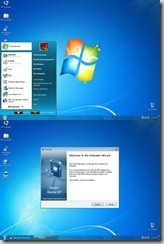
၀င္းဒိုးXpကုိ၀င္းဒုိး7အသြင္းေျပာင္းေသာေဆာစ့္၀ဲလ္


ေခါင္းစဥ္ကိုဖတ္ပီးသူငယ္ခ်င္းတို႔စိတ္၀င္စားမယ္ထင္တယ္ တကယ္လည္းဟုတ္ပါတယ္ခင္ဗ်ာ
SYSTEM ပုိင္းဆုိင္ရာေတြကလဲြပီး ကြန္ပ်ဴတာDesktopျမင္ကြင္း start up ျမင္းကြင္း Turn off ျမင္းကြင္း Floderျမင္းကြင္း
ကြန္ပ်ဴတာ ဖြင့္/ပိတ္ ရင္ျမည့္တဲ့အသံ
စတဲ့ အရာအားလံုးကုိ Xp ပံုစံကေန ၀င္းဒိုး7 ပံုစံအျဖစ္ေျပာင္းလဲသြားပါတယ္


ဒီပံုေလးက ကြ်န္ေတာ္စက္မွာတင္ထားတဲ့ပံုစံပါ သူကုိDownloadခ်င္ရင္ေတာ့ http://www.deviantart.com/
မွာေဒါင္းနုိင္ပါတယ္ 22.8MB ရိွပါတယ္

အခုလိုပံုကုိDownloadခ်င္ရင္ေတာ့ http://www.deviantart.com/ မွာေဒါင္းနုိင္ပါတယ္19.1MBပါ
အခုပံုကေတာ့၀င္းဒုိးXpကေနVista ပံုစံေျပာင္းတဲ့ေဆာစ့္၀ဲလ္ေလးပါDownloadခ်င္ရင္ေတာ့
http://www.deviantart.com/မွာေဒါင္းနုိင္ပါတယ္ 8.9MBရွိပါတယ္
ဒါကေတာ့၀င္းဒိုး Vistaကေန ၀င္းဒိုး7 ပံုစံေျပာင္းတဲ့ပံုပါ
Downloadခ်င္ရင္ေတာ့ http://www.deviantart.com/ 18MBရွိပါတယ္
http://www2.niwradsoft.com/ ဒါကေတာ့မႈရင္းလိပ္စာပါခင္ဗ်ာ ထပ္ပီးေလ့လာခ်င္သူေတြသြားေလ့လာနုိင္ပါတယ္ခင္ဗ်ာ
http://www.deviantart.com/ ကုိကလစ္လိုက္ရင္ Download ဖုိင္တစ္ခါတည္းက်လာပါတယ္ ဒါရိုက္Downloadလိုင္းပါခင္ဗ်ာ

Metro UI Color Changer For Windows 8


Metro UI Color Changer For Windows 8
 သူက ၀င္းဒိုး8 မွာကာလာခ်ိန္းတဲ့ ေဆာစ့္၀ဲလ္ေလးပါ ကြ်န္ေတာ္အြန္လုိင္းမွာေတြ႔လို႔ျပန္မွ်ေ၀လိုက္တာ
အသံုလိုတဲ့သူေတြအဆင္ေျပက်ပါေစ

မွာေလ့လာနုိင္ပါတယ္
ကဲ...ဆရာေလးသဲသဲေရ...  ေတာ္ကီေတာ့မဟုတ္...သိတယ္ေနာ္...စိတ္၀င္စားေနတဲ့ ဟာေလးေလ။
ပီပီေလး အဆင္သင့္ၿဖစ္ရင္ေၿပာ...

Try Windows 8 on you PC. You need a PC with 1GHz or faster processor (either 32- or 64-bit), 1GB of RAM (2GB for 64-bit), 16GB of hard disk space (20GB for 64-bit), DirectX 9 graphics with WDDM 1.0 or higher driver.

Download the Windows 8 Developer Preview ISO 64 & 32 :-


Windows Developer Preview with developer tools English, 64-bit (x64)


Windows Developer Preview English, 64-bit (x64)

Windows Developer Preview English, 32-bit (x86)
Windows 8 Developers Preview Product key:

6RH4V-HNTWC-JQKG8-RFR3R-36498
Windows Server 8 Developers Preview product key: 4Y8N3-H7MMW-C76VJ-YD3XV-MBDKV
စမ္းခ်င္ရင္ေၿပာ....လာခဲ့မယ္ေလ..ေဘာ္ေဘာ္တို့..ၿပဴတင္းေပါက္တင္ေပးဖို့ေၿပာတာ..
                     KO SOE MOE

Sunday, October 23, 2011

၀င္းဒိုး 7 အတြက္ အက္တီေဗးရွင္း ကီးေတြပါ ္


6JQ32-Y9CGY-3Y986-HDQKT-BPFPG
MT39G-9HYXX-J3V3Q-RPXJB-RQ6D7
9JBBV-7Q7P7-CTDB7-KYBKG-X8HHC
MM7DF-G8XWM-J2VRG-4M3C4-GR27X
KBHBX-GP9P3-KH4H4-HKJP4-9VYKQ
BCGX7-P3XWP-PPPCV-Q2H7C-FCGFR
MVBCQ-B3VPW-CT369-VM9TB-YFGBP
C43GM-DWWV8-V6MGY-G834Y-Y8QH3
P72QK-2Y3B8-YDHDV-29DQB-QKWWM
RGQ3V-MCMTC-6HP8R-98CDK-VP3FM
Q3VMJ-TMJ3M-99RF9-CVPJ3-Q7VF3
KGMPT-GQ6XF-DM3VM-HW6PR-DX9G8
GPRG6-H3WBB-WJK6G-XX2C7-QGWQ9
6F4BB-YCB3T-WK763-3P6YJ-BVH24
MVYTY-QP8R7-6G6WG-87MGT-CRH2P
6F4BB-YCB3T-WK763-3P6YJ-BVH24
MVBCQ-B3VPW-CT369-VM9TB-YFGBP
C43GM-DWWV8-V6MGY-G834Y-Y8QH3
GPRG6-H3WBB-WJK6G-XX2C7-QGWQ9
MVYTY-QP8R7-6G6WG-87MGT-CRH2P

Thursday, October 20, 2011

Windows 7 Activator for All Versions

nistrator ကို ႏွိပ္ပါတယ္။
Image Hosting by Picoodle.com
ၿပီးရင္ လိုင္စင္ကို သေဘာတူေပးလိုက္ပါ။ administrator run အတြက္ Confirm ထပ္ေတာင္းပါတယ္။ Ok ေပးလုိက္ပါ။ ေနာက္ဆံုး ေအာက္ကအတိုင္း cmd screen အျပာ ေပၚလာပါတယ္။ screen 1 လို႔ ဆိုပါစို႔ …
Image Hosting by Picoodle.com
Enter your Choise ? တဲ႔ … ရွင္းပါတယ္။ အေပၚဆံုး A က 32 bit Windows 7 ေတြအတြက္ပါ။ သူ႔ကို run ဖို႔ a ကို ကီးဘုတ္မွာ ႏွိပ္ေပးလိုက္ရံုပါပဲ။ ႏိွပ္ၿပီးတာနဲ႔ ေအာက္ပါအတိုင္း Press any Key to Continue ဆိုၿပီး ေပၚပါတယ္။ Screen 2 ေပါ႔ .. ။ ကီးတစ္ခု ႏွိပ္ေပးလိုက္တာနဲ႔ Screen 1 ကို ျပန္ေရာက္ပါတယ္။
Image Hosting by Picoodle.com
ကီးအတြက္ေတာ႔ a နဲ႔ b ကို run ေပးၿပီးရင္ ရပါတယ္။ windows tittle bar မွာ ပါလာတဲ႔ Send Feedback ဆိုတာကို ျဖဳတ္ခ်င္ရင္ေတာ႔ f ကို ႏွိပ္ေပးေပါ႔ ။
Image Hosting by Picoodle.com
နားလည္မယ္ထင္ပါတယ္။ အရင္ Activator ေတြ သံုးထားတာ ရိွခဲ႔ရင္ အဲဒါေတြကို အရင္ Install လုပ္ဖုိ႔အတြက္ c d ကို ႏွိပ္ေပးၿပီး uninstall အရင္ လုပ္ေပးပါ။ က်န္တာေတြလည္း နားလည္မွာပါ။ Restart လုပ္ေပးလုိက္ၿပီးရင္ေတာ႔ သက္တမ္းအတြက္ Activation မေပၚႏိုင္ေတာ႔ပါဘူး …
Image Hosting by Picoodle.com

Hardware Requirement For Windows 7

Windows 7 တင္ေပးဖို႔အတြက္ မိမိ PC နဲ႔ အသံုးျပဳႏိုင္ မျပဳႏိုင္ သိရေအာင္ Hardware Requirement ကို အရင္ေရးလိုက္ပါတယ္။


# 1 gigahertz (GHz) or faster 32-bit (x86) or 64-bit (x64) processor
# 1 gigabyte (GB) RAM (32-bit) or 2 GB RAM (64-bit)
# 16 GB available hard disk space (32-bit) or 20 GB (64-bit)
# DirectX 9 graphics device with WDDM 1.0 or higher driver
Microsoft ရဲ႕ official site မွာေတာ႔ ဒီတိုင္းပဲ ေရးထားပါတယ္။ (စတင္ အသံုးျပဳသူမ်ားအတြက္) ေသခ်ာ နားလည္ေအာင္ က်ေနာ္ထပ္ရွင္းျပပါ႔မယ္။

! .. 1 GHz ႏွင္႔အထက္ ရိွေသာ processor (x86 version အတြက္ x32-bit CPU လိုအပ္ၿပီး၊ x64 version အတြက္ x64-bit CPU ျဖစ္ပါတယ္)

! .. 32-bit အတြက္ RAM 1 GB ႏွင္႔၊ 64-bit အတြက္ RAM 2 GB
! .. 32-bit အတြက္ 16 GB စာေနရာလြတ္ေသာ hard disk partition တစ္ပိုင္း၊ 64-bit အတြက္ 20 GB
! .. DirectX 9 ကို Support လုပ္ေပးႏိုင္ေသာ 128 MB memory graphics (Aero Theme ကို အသံုးျပဳရန္အတြက္)
နားလည္သြားမယ္လို႔ထင္ပါတယ္။ Hardware ကို ဒီေလာက္ အနိမ္႔ဆံုး ရိွရမယ္လို႔ ေျပာထားတာျဖစ္ပါတယ္။ ( ပိုျမင္႔ေလ ေကာင္းေလေပါ႔)။ က်န္တာေတြကေတာ႔ ရွင္းမွာပါ။ မိမိ CPU ဟာ 32-bit လား 64-bit လား သိႏိုင္ဖို႔ သူ႕ရဲ႕ ကုမၸဏီ site မွာ ရွာၾကည္႔ဖို႔ လိုပါတယ္။ (ဥပမာ – T4200 ) သို႕မဟုတ္ ဒီေဆာ႔၀ဲလ္ နဲ႔လည္း သိႏိုင္ပါတယ္။
64-bit processor က 32-bit windows ကို အသံုးျပဳႏိုင္ေသာ္လည္း၊ 32-bit processor က 64-bit windows ကို အသံုးျပဳႏိုင္မွာ မဟုတ္ဘူးဆိုတာ သိထားသင္႔ပါတယ္။ ကဲ … ဒါဆိုရင္ မိမိ PC က Windows 7 သံုးႏိုင္ မသံုးႏိုင္ သိသြားပါၿပီ။
Vista အတြက္ပါ တလက္စထဲ ေဖာ္ျပေပးလိုက္ပါတယ္။
# 1 GHz processor (32- or 64-bit)
# 512 MB of RAM (for Home Basic); 1 GB of RAM for all other versions
# 15 GB of available disk space
# Support for DirectX 9 graphics and 32 MB of graphics memory (for Home Basic); 128 MB of graphics
ဪ … သတိမထားမိမွာစိုးလို႔ ျဖည္႔စြက္ တစ္ခ်က္ တိုးေပးလိုက္ပါတယ္။ 7 ေရာ Vista ပါ ႏွစ္ခုစလံုးက DVD version မ်ား ျဖစ္တဲ႔အတြက္ အနည္းဆံုး DVD RW (သို႔) DVD Combo drive ျဖစ္ရပါမယ္။

၀င္းဒိုး 7 Ultimate 32bit


၀င္းဒိုးစ္ဆဲဗင္း (Ultimate 32bit x86) ကို စုစုေပါင္း ဖုိင္ဆိုဒ္ 2.32 gb ရွိပါတယ္။ မရွိေသသည့္ လိုခ်င္သည့္သူငယ္ခ်င္းမ်ားေအာက္မွာ ေဒါင္းလုတ္လုပ္ႏိုင္ပါသည္။ khwekabaung တင္ထားသည္ကို တဆင့္ျပန္လည္ မွ်ေ၀ေပးပါသည္။

Download below: